User Code (C++)
This section assumes you know the basics of C++ and ROS 2. To learn ROS 2, see Tutorials | ROS 2 Documentation for tutorials.
Among the ROS packages in a Tobas project created with Setup Assistant (e.g., tobas_f450.TBS), the user C++ package (e.g., tobas_f450_user_cpp) is a C++ package you can freely edit. It contains the following five launch files:
common_(interface/realtime).launch.py: Runs on both real hardware and in simulation.real_(interface/realtime).launch.py: Runs only on real hardware.gazebo.launch.py: Runs only in simulation.
Both common and real have interface and realtime launch files.
Nodes started by the former can communicate over the network via ROS, while nodes started by the latter cannot.
For nodes started by *_realtime.launch to communicate over the network,
they must go through an interface node started by *_interface.launch.
This arrangement prevents the node discovery algorithm in DDS, the ROS 2 backend, from adversely affecting real-time performance.
As an example, create a C++ node that checks GNSS status and publishes a message once per second when a 3D fix is available.
Edit tobas_f450_user_cpp/nodes/user_node.cpp as follows.
#include <tobas_constants/ros_interface.hpp>
#include <tobas_node/node.hpp>

#include <tobas_msgs_adapter/gnss.hpp>

class UserNode : public tobas::BaseNode
{
  using self = UserNode;
  using super = tobas::BaseNode;

public:
  explicit UserNode(const rclcpp::NodeOptions& options = rclcpp::NodeOptions());

private:
  tobas::ros2::SubscriberPtr<tobas_msgs::Gnss> gnss_sub_;

  void gnssCb(const tobas_msgs::Gnss::ConstSharedPtr& gnss);
};

UserNode::UserNode(const rclcpp::NodeOptions& options)
  : super("gnss_state_checker", nodeOptions_Default(options))
{
  gnss_sub_ = createSubscriber<tobas_msgs::Gnss>(tobas::topic::kGnss, &self::gnssCb, this);
}

void UserNode::gnssCb(const tobas_msgs::Gnss::ConstSharedPtr& gnss)
{
  if (gnss->fix_type == tobas_msgs::msg::Gnss::FIX_3D) {
    TOBAS_INFO_THROTTLE(1., "GNSS 3D Fix");
  }
}

RCLCPP_COMPONENTS_REGISTER_NODE(UserNode)
Add the dependencies used by this node to tobas_f450_user_cpp/package.xml.
<depend>tobas_constants</depend>
<depend>tobas_node</depend>
<depend>tobas_msgs_adapter</depend>
Add the node to the build targets.
Add the dependencies to tobas_f450_user_cpp/CMakeLists.txt and uncomment the build instructions.
cmake_minimum_required(VERSION 3.25)
project(tobas_f450_user_cpp)

if(NOT CMAKE_BUILD_TYPE AND NOT CMAKE_CONFIGURATION_TYPES)
  set(CMAKE_BUILD_TYPE "Release" CACHE STRING "Build type (default Release)" FORCE)
endif()

set(CMAKE_CXX_STANDARD 23)
set(CMAKE_CXX_STANDARD_REQUIRED ON)
set(CMAKE_CXX_EXTENSIONS OFF)
set(CMAKE_CXX_FLAGS "${CMAKE_CXX_FLAGS} -Wall -Wextra -Wpedantic -Wshadow -Wswitch-enum -Werror")
set(CMAKE_POSITION_INDEPENDENT_CODE ON)

set(AMENT_DEPENDENCIES
  rclcpp
  rclcpp_components
  tobas_constants
  tobas_node
  tobas_msgs_adapter
)

find_package(ament_cmake REQUIRED)

foreach(dependency IN ITEMS ${AMENT_DEPENDENCIES})
  find_package(${dependency} REQUIRED)
endforeach()

include_directories(include)

add_library(${PROJECT_NAME} SHARED nodes/user_node.cpp)
ament_target_dependencies(${PROJECT_NAME} ${AMENT_DEPENDENCIES})
target_link_options(${PROJECT_NAME} PRIVATE -Wl,--no-undefined)
rclcpp_components_register_node(${PROJECT_NAME} PLUGIN "UserNode" EXECUTABLE user_node)

install(
  TARGETS ${PROJECT_NAME}
  EXPORT ${PROJECT_NAME}
  LIBRARY DESTINATION lib
  ARCHIVE DESTINATION lib
  RUNTIME DESTINATION bin
  INCLUDES
  DESTINATION include
)

install(DIRECTORY launch DESTINATION share/${PROJECT_NAME})

ament_package()
Configure the node to start automatically. You can start it as a regular ROS node, but here we load it as a component to eliminate copying in topic communication.
Tobas runs three component managers (component_manager_x (x=1,2,3)), each on a separate CPU.
Topic communication between their components also uses zero-copy transport.
Lower-numbered managers handle faster, more latency-sensitive processing. Their approximate roles are:
component_manager_1: IMU filtering, state estimation, attitude/position control, etc. (400-800 Hz)component_manager_2: Path planning, mission execution, etc. (30-100 Hz)component_manager_3: Parameter server, logging, fail-safe processing, etc. (1-10 Hz)
The example node has no strict real-time requirements, so load it into component_manager_3, which handles the slowest processing.
Uncomment the add_action section in tobas_f450_user_cpp/launch/common_realtime.launch.py.
# Do not delete or rename this file because it is executed in tobas_f450_config/common_realtime.launch.py.

from launch import LaunchDescription
from launch_ros.actions import LoadComposableNodes
from launch_ros.descriptions import ComposableNode


def generate_launch_description():
    ld = LaunchDescription()

    # Please add the nodes that run both on real hardware and in simulation, with real-time requirements.

    ld.add_action(
        LoadComposableNodes(
            target_container=f"f450/component_manager_3",
            composable_node_descriptions=[
                ComposableNode(
                    package="tobas_f450_user_cpp",
                    plugin="UserNode",
                    extra_arguments=[{"use_intra_process_comms": True}],
                ),
            ],
        )
    )

    return ld
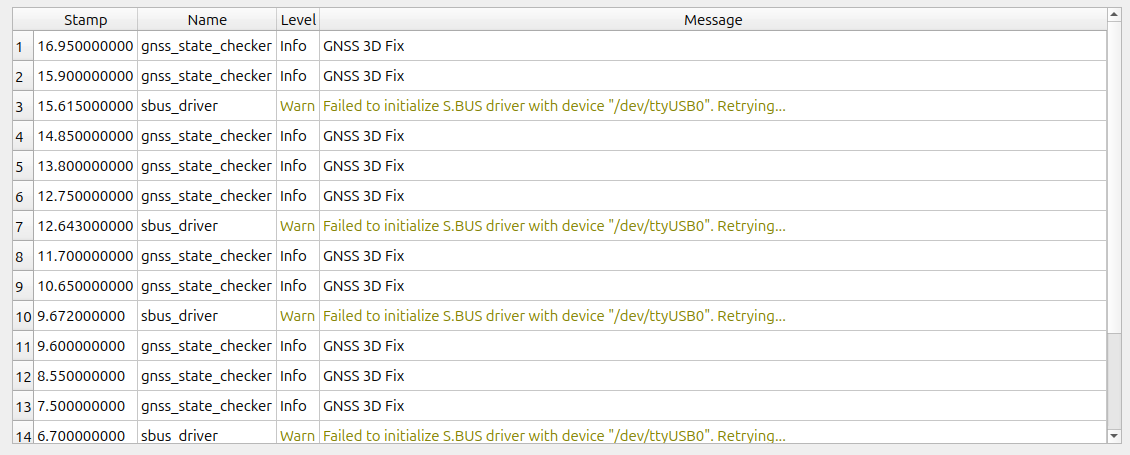
When you start the simulation from the GCS, messages appear in the Control System console.
See ROS API for API details.